Why Two-Factor Authentication (2FA) Is Essential for WordPress Security & How MoeSec Protects Your Site with Advanced 2FA Controls
WordPress powers over 40% of the web, making it a prime target for hackers and cybercriminals. In 2025, brute force attacks, credential theft, and unauthorized logins remain among the most common ways WordPress sites get compromised. One of the most effective, proven ways to stop these attacks is Two-Factor Authentication (2FA).
In this article, you’ll learn:
- Why 2FA is crucial for every WordPress website
- How advanced 2FA enforcement can dramatically reduce your risk
- How the Free MoeSec WordPress Security Plugin gives you full control over 2FA for all users and roles
- Why upgrading to MoeSec Website Security Platform with its Website Firewall (WAF) takes your protection even further
What Is Two-Factor Authentication (2FA) and Why Is It Important?
2FA adds a second layer of security beyond just your password. Even if an attacker steals or guesses your password, they cannot log in without a second “factor” typically a code sent to your email or generated by an app like Google Authenticator.
Key benefits of 2FA:
- Stops brute force attacks, even if passwords are weak or reused
- Prevents unauthorized access if credentials are leaked or phished
- Reduces the risk of admin or editor accounts being hijacked
How MoeSec WordPress Security Plugin Empowers You With Advanced 2FA Controls
The Free MoeSec WordPress Security Plugin (available on WordPress.org and MoeSec.com) takes 2FA far beyond basic “on/off” options. MoeSec’s granular enforcement makes 2FA a true requirement, not just a suggestion.
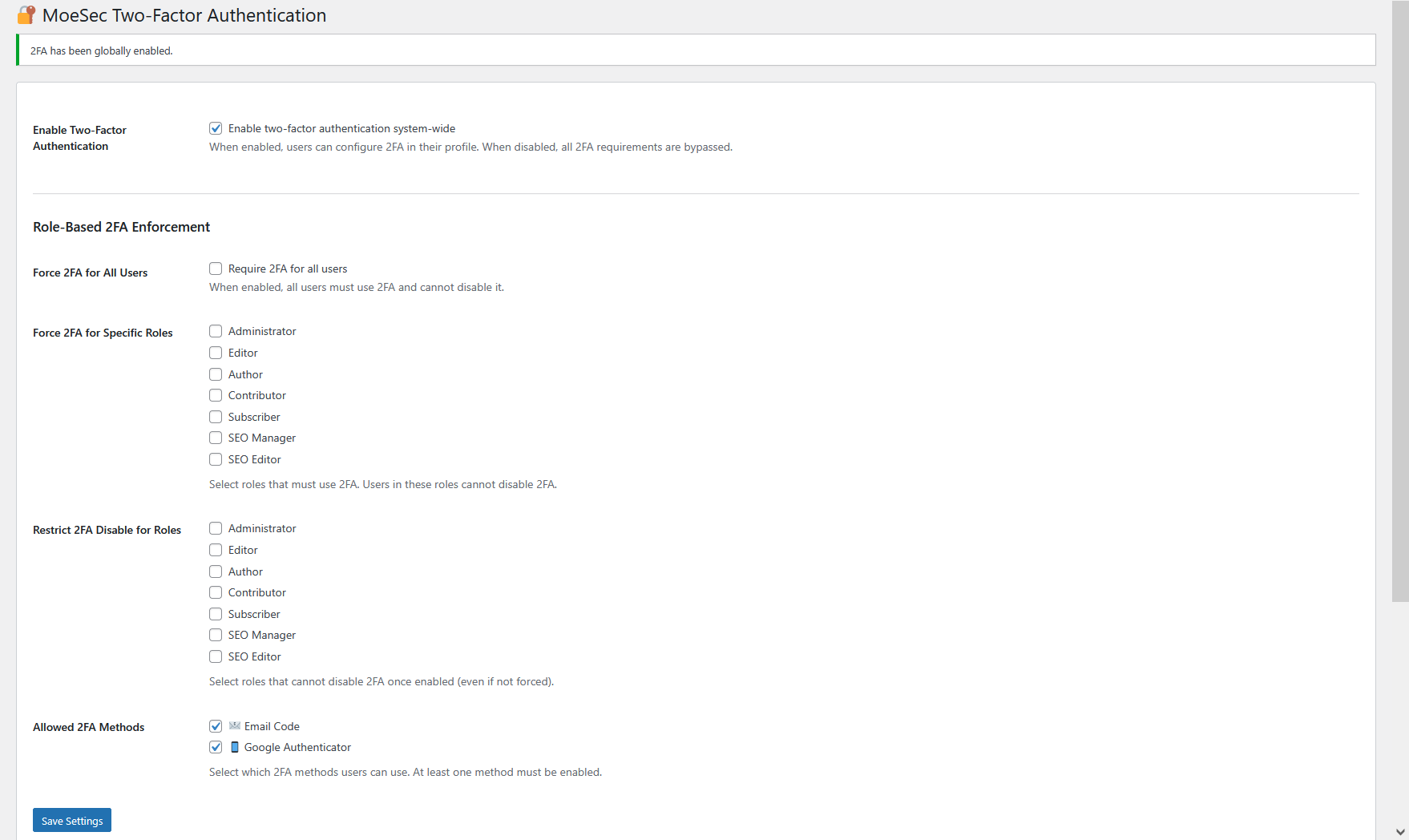
1. Force 2FA for All Users
Admins can require that every user on the site must use 2FA. No exceptions, everyone from admins to subscribers will be protected.
2. Force 2FA for Specific Roles
Need to enforce 2FA for only Administrators and Editors, but not Subscribers? MoeSec lets you select exactly which WordPress roles are required to use 2FA.
3. Restrict 2FA Disable
Worried that users might turn off 2FA? MoeSec allows you to prevent certain roles from disabling 2FA once it’s enabled, ensuring compliance for your most critical accounts.
4. Allowed 2FA Methods
You can select which methods are permitted: Email, Google Authenticator, or both. This flexibility lets you balance ease-of-use and security.
5. User Profile Enforcement
Users in roles where 2FA is required will see a clear warning in their user profile and cannot disable 2FA. The checkbox is locked and the reason is shown.
6. Login Enforcement
2FA is enforced at login, regardless of user preference. If a user’s role requires 2FA, they must complete the second factor before accessing the dashboard.
How It Works: MoeSec’s 2FA Enforcement
- When 2FA is forced for a role, users in that role must set up and use 2FA and cannot disable it.
- User profiles display a warning when 2FA is mandatory, and disabling options are grayed out.
- MoeSec’s admin settings give you fine-tuned control over which roles are affected, and which 2FA methods are available.
- Enforcement is checked both when saving the profile, and at every login, so nothing slips through the cracks.
Result: Whether you run a single-author blog or a multi-user site, you can guarantee your most important accounts are always protected.
Even More Protection: MoeSec Website Security Platform & Website Firewall (WAF)
For maximum security, MoeSec’s Website Security Platform adds an enterprise-grade Website Firewall (WAF) on top of your existing defenses.
How MoeSec WAF Keeps Your Admin Panel Safe
- Blocks Brute Force Attacks: All login attempts are filtered before they reach your website.
- Protects Admin Dashboards & Control Panels: Restrict access to your CMS admin panel, Hosting Control panels, Private and sensitive or any backend area by IP address or with extra credentials.
- Virtual Patching: Protects against zero-day vulnerabilities, SQL injection, XSS, and more.
- Compatible with All Platforms: Works with WordPress, WooCommerce, Magento, Joomla, Drupal, Prestashop, OpenCart, custom sites, and any CMS.
Tip: Combine the free plugin’s 2FA controls with MoeSec WAF and firewall for unbeatable website protection!
How to Get Started with MoeSec 2FA
- Install the MoeSec Security Plugin from WordPress.org or via your WordPress dashboard.
- Go to the MoeSec settings and enable 2FA enforcement as needed:
- Force 2FA for all or specific roles
- Choose 2FA methods (Email, Google Authenticator, or both)
- Set restrictions on disabling 2FA
- Save and notify your users. They’ll be prompted to set up 2FA at next login.
- Consider upgrading to MoeSec Website Security Platform for WAF and expert protection.
Conclusion
2FA is no longer optional – it’s a must-have for any website. The free MoeSec WordPress Security Plugin gives you powerful, flexible controls to enforce 2FA the way your business needs. For next-level protection, add MoeSec’s Website Firewall and relax knowing your site, users, and data are safe.